![ONLIVE.SITE_LOGOTYPE_WHITE 1.png]](https://knowledge.onlive.ai/hs-fs/hubfs/ONLIVE.SITE_LOGOTYPE_WHITE%201.png?height=40&name=ONLIVE.SITE_LOGOTYPE_WHITE%201.png)
What is Live Shopping and why does it work?
Live Shopping is not just about hosting a live event: it’s a new way of selling by connecting with your customers in real time. It allows you to humanize your brand, answer questions instantly, and turn shopping into a more engaging and enjoyable experience.
It’s not about being perfect from day one, but about building a long-term strategy, with consistency, quality content, and realistic goals.
The key: engagement before conversion
In Live Shopping, conversion is the result of engagement. When you interact with your audience (answer questions, read comments, run polls or games), you improve the customer experience and boost key metrics such as:
-
Conversion rate
-
Average order value
-
Viewing time
The more your audience participates, the more likely they are to buy.
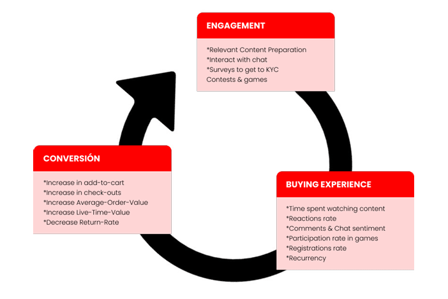
How do you know if you’re generating engagement?
Some simple indicators:
- Time spent watching the live stream
Live shopping viewers not only spend more time on a specific site, but also tend to browse different landing pages (product pages, checkout, etc.), which has a direct positive impact on SEO.
- User registrations (leads)
Thanks to contests and games that require user registration, 84% of users who attended Onlive.site live shows registered with their real names and email addresses (if you can win a prize, you don’t use a fake email ;) ). - Participation in polls and games
Live polls are a powerful tool for market research and for getting to know your customers better. In a fast-changing world, they act as a “live lab” to gather ideas and feedback about your products or brand.
Contests also play a key role in keeping users attentive and creating a more fun and engaging experience. - Comments, likes, and chat reactions
Simple tricks like greeting users by name or reading chat messages out loud significantly increase likes and chat activity. - Positive tone of messages
Encouraging users to comment and responding during or after the live stream helps build a stronger connection with your community. - Post-event satisfaction
Onlive.Site allows you to track user satisfaction at the end of the show, reflecting how positive the overall experience was.
Test, measure, and improve
There is no one-size-fits-all formula. The best approach is to experiment:
- Different days and time slots
Check your website and social media analytics to identify the most popular days and peak traffic times. Test both weekdays and weekends until you find what works best.
Avoid certain holidays and focus on high-commerce periods (Mother’s Day, pre-Christmas, Black Friday, Cyber Monday, etc.). - Short, dynamic lives vs. longer sessions
To entertain your audience, you need to offer them content and products that interest them, while keeping the session fast-paced and interactive. Try out different lengths and see what works best for your audience: short sessions with a few products on a specific topic, or longer sessions covering more general topics. - The magic of the host
You don’t need a big influencer, but you do need a charismatic host with strong communication skills who feels comfortable on camera and engages with the audience.
Which format works best?
Vary content and formats to surprise your audience:
-
Product or collection launches
-
Interviews
-
Tutorials
-
Behind-the-scenes content
-
Contests and games
Listen to your audience and adjust based on what performs best.
How to attract an audience to your live shows
The goal isn’t a single event, but building a loyal community.
- Create curiosity by sharing content about the event
A few days before the event, start promoting the show on different social media platforms. Create events, posts, stories, live streams, and make sure to always include important information about the event (date and time, location, how people can participate, and what they can expect from the event). Generate intrigue by sharing content about the event, create urgency by using countdowns on Instagram, announce exclusive promotions live to create FOMO, or lean on influencers and brand collaborators to maximise the reach of your event. - Promote the event on social media, websites, and newsletters.
- Rely on collaborators or influencers.
- Commit to an omnichannel strategy (website, Instagram, Facebook, YouTube, etc.)
- Use reminders, exclusive discounts, and games
Create FOMO by promoting new products that have never been seen before, announce discounts and exclusive promotions only for show attendees, promote games and contests with prizes for participants, etc.
Best practices before, during, and after the event
Before
Use all channels and touchpoints with your community to announce and promote your event, just as you would when promoting major events.
- Plan your communication (website, social media, email)
You need to plan the content, visuals, when each strategy is activated, and how often the event is promoted. - Announce the event with all key information (when, where, and what it’s about) at least one week in advance.
- Send several reminders throughout the week.
We recommend explaining through stories—and saving them—what the event will be like, its duration, and what attendees will find (gifts, discounts, influencers, etc.), as well as briefly introducing the concept of “live shopping,” which may be new for many of your customers. - Create a landing page or a clear space for the event
Create a dedicated section/page to integrate the widget through which you will broadcast the live event. It is a good practice to include a set of tips or instructions on the page for first-time live shopping viewers, explaining what they will be able to do during the event.
During
-
Explain how the live shopping experience works
Start by explaining how liveshopping works and what viewers will be able to do (click on product snippets, add to basket, purchase, register to play the competition, respond to surveys, etc.). - Interact constantly with the chat
Greet chat viewers by name, read aloud some questions, and answer them in real time. Engage the audience with questions and quizzes. Share survey results for greater transparency and immediacy. - Engage the audience with polls and quizzes
Always mention the limited time nature of promotions to encourage them to buy. - Reinforce exclusive, time-limited promotions
- Keep excitement high until the end with surprises or giveaways
Having a surprise announcement or guest, or offering a prize draw at the end of the broadcast, increases the chances that viewers will stay hooked on your live stream. Build anticipation for the next show: announce the date, time and theme, but keep guests and exclusive benefits a surprise.
After
-
Thank your audience for participating.
-
Share the recorded video
Direct users who have missed it so that they can watch it later. -
Analiza los resultados.
Study the event report and check whether the objectives you set for the show have been met. -
👉 Learn from each event and improve the next one!