![ONLIVE.SITE_LOGOTYPE_WHITE 1.png]](https://knowledge.onlive.ai/hs-fs/hubfs/ONLIVE.SITE_LOGOTYPE_WHITE%201.png?height=40&name=ONLIVE.SITE_LOGOTYPE_WHITE%201.png)
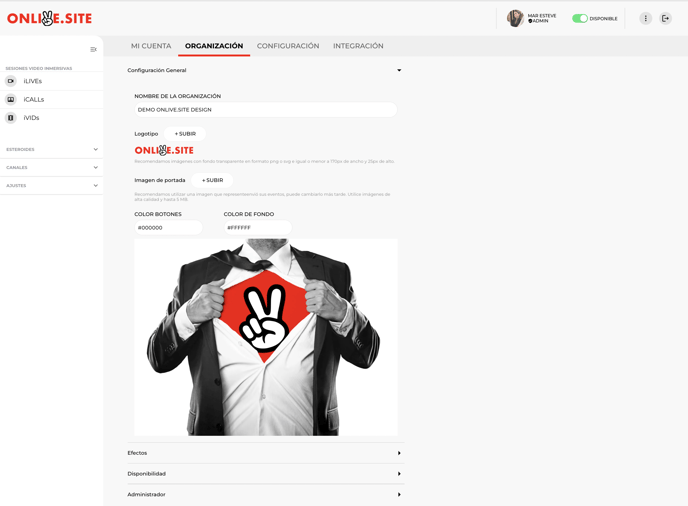
With this video you will learn how to personalize at any time the most basic elements of your brand within your onlive.site account
- Organization name:Name of your business. This field will appear in notification emails to users who subscribe to any type of event.
- Logo: It will appear in sessions 1-1, live events 1-Many and shoppable videos. Also in the automatic notifications emails sent to users.
- Cover image: It will be visible to user during a session 1-1, before the user can access the icall/videocall. It will also be present as the cover image of your 1-Many events or shoppable videos in case of not customizing each cover for each event/video.
- Buttons color
- Background color: Frame around the video in sessions 1-1, 1-Many or shoppable videos.
- Effects: Here you can upload images that can be used as background image during icalls 1-1 and 1-Many Live events.
- Availability: You can set the working hours and days of your organization in general for the 1-1 button that allows you to schedule appointments with your business team.