![ONLIVE.SITE_LOGOTYPE_WHITE 1.png]](https://knowledge.onlive.ai/hs-fs/hubfs/ONLIVE.SITE_LOGOTYPE_WHITE%201.png?height=40&name=ONLIVE.SITE_LOGOTYPE_WHITE%201.png)
By positioning the vms.onlive.site website as active, all functionalities will remain active even if you have not opened the tab for some time.
In modern browsers, if a tab is not active, certain processes such as real-time updates or JavaScript executions may be slowed down or paused to save resources. By keeping a page active, you ensure that these processes continue to run at 100%.
Security systems, server notifications, etc. present on the onlive.site platform must remain active so that you don't lose important information.
Some web applications (such as mail sessions or remote systems) automatically disconnect the user if they detect prolonged inactivity. Keeping the tab active can prevent this.
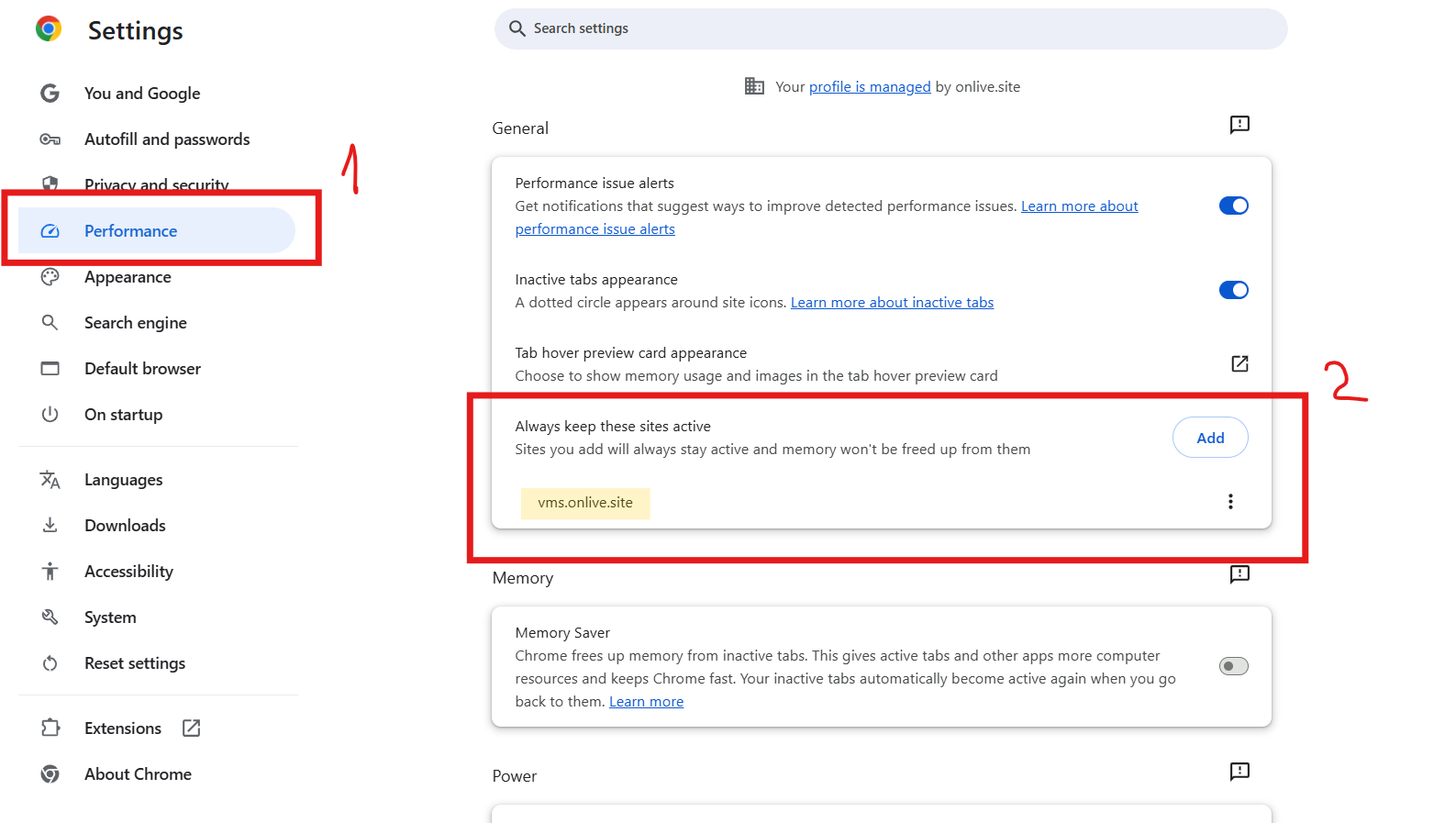
To add the Onlive platform to the list of always-on pages, follow these steps:
Browser Settings > Performance> Always keep these sites active