
BOOK NOW, DRIVE LATER?
Purpose of Event
- Showcase a car model in a showroom to generate test drive bookings for the days following the event. The test drives do not happen within the same day.
- Bookings follow the Business as Usual workflow but are tracked separately from regular bookings for analytical purposes.
Steps to Manage Event Bookings
1. Generate an Event-Specific URL
- Go to the Services section in the backend system.
- Locate the service template: “Test Drive Event” and click on the sharing button.
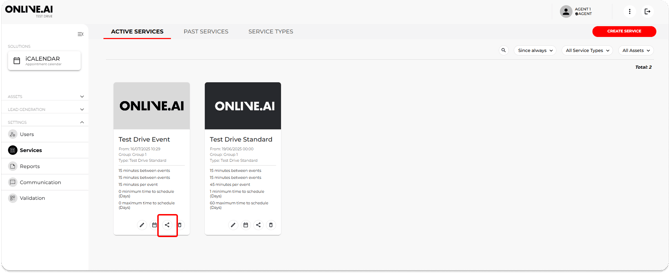
- In the pop-up, you will see two ways to embed this service “Test Drive Event”.
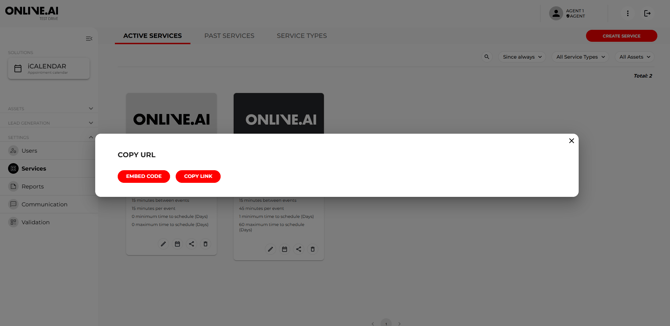
2. Create a QR Code
- Convert the event-specific URL into a QR code using a QR code generator (e.g., me-qr.com).
- Share the QR code with the sales team and display it on posters, roll-ups, or iPad screens at the event.
- Attendees can scan the QR code to make bookings directly from their mobile devices.
Manual Booking by Agents
If attendees need assistance booking:
- Access the Services section in the backend.
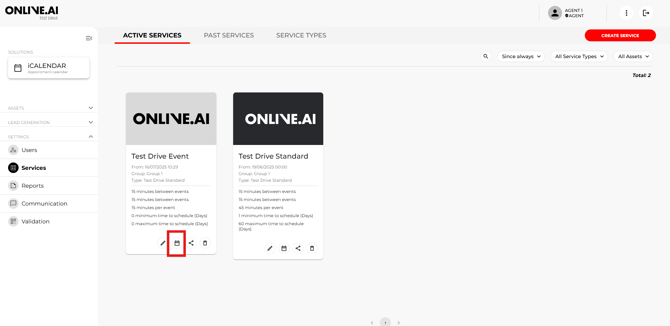
- Select “Test Drive Event” and click the calendar icon to open booking details.
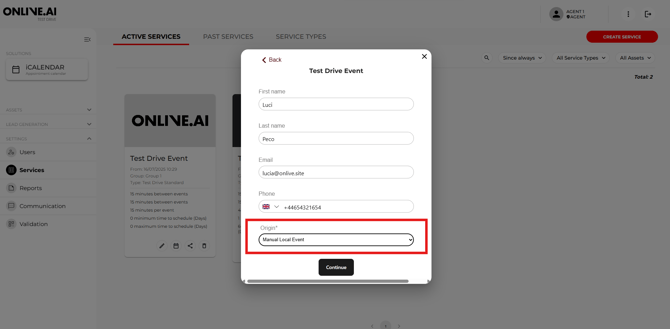
- Enter the booking information, including:
- Date and time.
- Attendee details.
- Set the SOURCE field to “Manual-Local Event.”
- Add relevant comments about the event in the Comments section.
- Confirm the booking:
Internet Connection
Ensure a reliable internet connection at the event venue to facilitate online workflows and manual bookings.
Adjust Car Availability (If Applicable)
-
Event During Test Drive Hours:
- The car used for display must be marked Unavailable in the Test Drive Standard template.
- Adjust availability as soon as event dates are confirmed to prevent double bookings.
- In case of any questions, please contact our support team to assist you hereby.
-
Event Outside Test Drive Hours:
- No changes to car availability are needed.
By following these steps, bookings from the event will be properly tracked and managed, ensuring smooth workflows and accurate analytics.