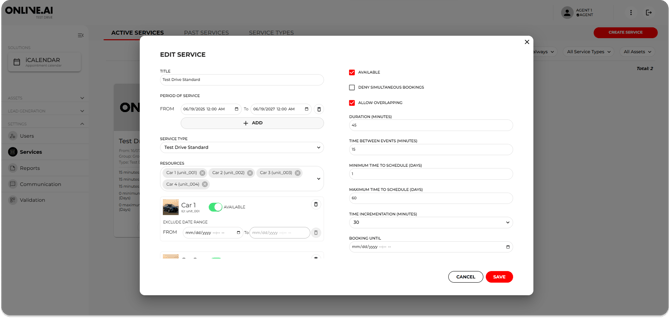
From the Services section, it is possible to edit parts of the service availability template in question by clicking on the edit icon (pencil). The main data fields that can be edited by a Agent are explained below:
- Title
- Service period
- Asset associated with this service
- Group
- Service duration
- “Buffer” time between services
- Minimum notice before the test drive
- Days shown by default in the calendar
- Extra fields (These fields are the ones that will appear in the notification e-mail templates)
Remember that you might need to scroll down to see all the parameters that can be edited.
Clicking on the edit icon will open a pop-up window with all the information about the service in question. Here it will be possible to edit the service title, the associated asset, the duration of the service being offered and the time you want to leave between the booking by one user and the next.