Market Landing:
Below is the video of the end-user's journey to make an instant booking for a Test Drive.
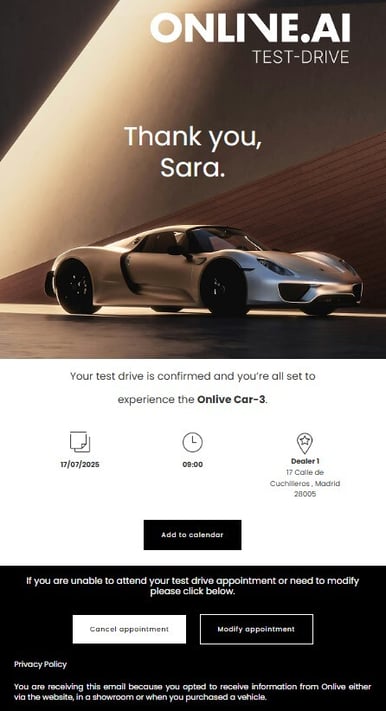
(confirmation email image)
The end user will go through the following steps to make a reservation:
- Selection of the model with which the Test Drive is to be carried out.
- Display of the nearest Dealers and selection of the Dealer.
- Selection of date and time.
- Enter your personal details (name, email, telephone number).
- Confirmation of the data entered.
- Validation of the email by requesting a validation/reservation code.
- Instant confirmation and receipt of the email with the appointment and contact details of the selected dealer.
Dealer Landing:
The user flow will be practically the same but will not visualise the map with the other dealerships and the end user will visualise only the availability of the agenda of that dealership. The user's route is as follows:
- Selection of the model with which the user wishes to carry out the Test Drive.
- Selection of date and time.
- Enter your personal details (name, email, telephone).
- Confirmation of the data entered.
- Validation of the email by means of a validation/reservation code request.
- Instant confirmation and receipt of the email with the appointment and contact details of the selected dealer.
Upon booking on any of the pages, the end user and the Agent/dealer will receive an instant email with the relevant booking information (date and time, Agent/dealer details). The end user will also receive a series of reminder emails in advance of their booking date.
From both the confirmation email and the reminders, the end user will have the option to cancel the booking if they are unable to attend. The user will not be able to modify the dates from the email, only cancel. To modify dates, the user will have two alternatives:
- Call the dealer so that the CUPRA Master can make the change directly from the backend of the tool.
- Cancel the booking and make a new booking from the marketplace or dealership landing page.
Example of a confirmation email: